How I Built an AI-Powered Speaking Practice Tool Without Knowing How to Code
A vibe coding journey from zero to a deployed web app in one afternoon

A vibe coding journey from zero to a deployed web app in one afternoon

I am Anastasiia, an English teacher based in Newcastle. I teach IELTS prep, conversational English, and business English to students from all over the world. I have zero background in software engineering. I always thought building a website was something that required a computer science degree and an unhealthy relationship with energy drinks. Turns out, I was only right about the energy drinks.
This is the story of how I built a fully functional AI-powered speaking practice tool for my students using nothing but Claude Code and a lot of curiosity. No tutorials, no Stack Overflow rabbit holes, no crying into my keyboard. Well, maybe a little bit of the last one.
Every week I get messages from potential students asking if they can try a lesson before committing. Fair enough. But scheduling trial lessons eats into my actual teaching time. I was basically running a free tasting menu at a restaurant that only has one chef.
What if there was a page on my website where anyone could practice speaking English on a random topic, get instant AI feedback on their grammar and vocabulary, and I would get notified on Telegram with their transcript?
That is basically a lead generation tool disguised as a free speaking exercise. Marketing people would call it a "value-first funnel." I call it being clever.
Before diving into the how, here is what the finished product does:
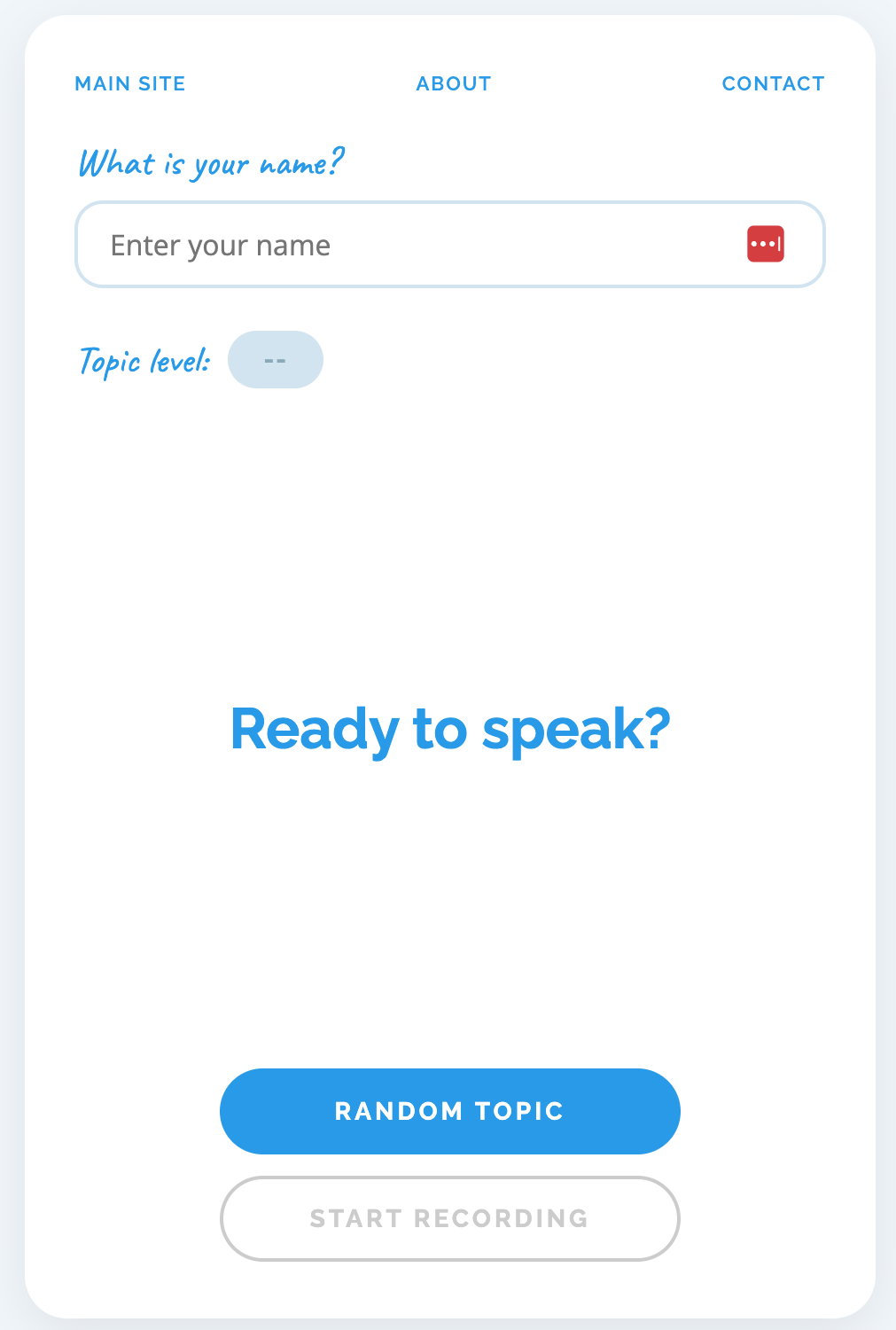
This was the first thing we tackled and honestly the part that made me feel like a wizard. A wizard with a laptop instead of a wand, but still. I described what I wanted to Claude Code in plain English:
We need a landing page for potential clients. They enter their name, get a random topic, record themselves speaking, and see AI feedback.
And it just... started building it. A single HTML file with everything inline: the CSS, the JavaScript, the speech recognition logic. No frameworks, no build tools, no mysterious folder full of 47,000 dependencies.
This was the part I was most nervous about. Turns out the browser can do speech-to-text for free using something called the Web Speech API:
const recognition = new (window.SpeechRecognition
  || window.webkitSpeechRecognition)();
recognition.lang = 'en-GB';
recognition.interimResults = true;
recognition.continuous = true;

recognition.onresult = (event) => {
  // Display live transcript as the user speaks
};
That is it. No paid API. No server-side processing. The browser listens to the microphone and spits out text in real time. Setting the language to en-GB was important because I teach British English. None of that "color without a u" business on my website.
I did not want boring textbook topics. Life is too short for "Describe your daily routine" when you could have "My celebrity crush" or "First date disasters." So we loaded the page with over 50 topics across three levels:
Each topic has a level tag that appears as a badge next to it. "My celebrity crush" has been surprisingly popular. Apparently everyone has strong feelings about Ryan Gosling.
The first version looked like it belonged on a website from 2008. Red and coral accents that clashed with everything. I said "more blue" and Claude swapped the entire colour scheme to match my brand colour #009cea. If only redecorating my flat was that simple.
"It felt like pair programming with someone who has infinite patience and never judges your questions."
The frontend can record and transcribe speech, but it needs somewhere to send that transcript for analysis. This is where things got slightly more technical. Slightly.
My website is hosted on AWS (S3 + CloudFront), so the obvious choice might have been AWS Lambda. But that needs API Gateway configuration, IAM roles, and a YAML file that could put anyone to sleep faster than a bedtime story. Cloudflare Workers have a generous free tier (100,000 requests per day), deploy in seconds, and the whole thing is a single JavaScript file. Decision made before the kettle boiled.
The entire backend is one file called index.js. It handles four things:
1 CORS so the browser is allowed to talk to it:
const ALLOWED_ORIGINS = [
  'https://britishenglish.me',
  'https://www.britishenglish.me',
  'http://localhost:8080'
];
2 Rate limiting so nobody hammers the endpoint:
const rateLimitMap = new Map();
const RATE_LIMIT = 5;
const RATE_WINDOW_MS = 3600000; // 1 hour
3 Claude API call to analyse the transcript. We use Claude Haiku because it is fast, cheap, and surprisingly good at spotting grammar mistakes (better than some of my students at spotting theirs):
const response = await fetch(
  'https://api.anthropic.com/v1/messages', {
  method: 'POST',
  headers: {
    'Content-Type': 'application/json',
    'x-api-key': env.ANTHROPIC_API_KEY,
    'anthropic-version': '2023-06-01'
  },
  body: JSON.stringify({
    model: 'claude-haiku-4-5-20251001',
    max_tokens: 1024,
    system: systemPrompt,
    messages: [{ role: 'user', content: transcript }]
  })
});
4 Telegram notification so I know when someone uses the tool. This runs in the background so the user does not wait:
ctx.waitUntil(sendTelegram(env, payload, feedback));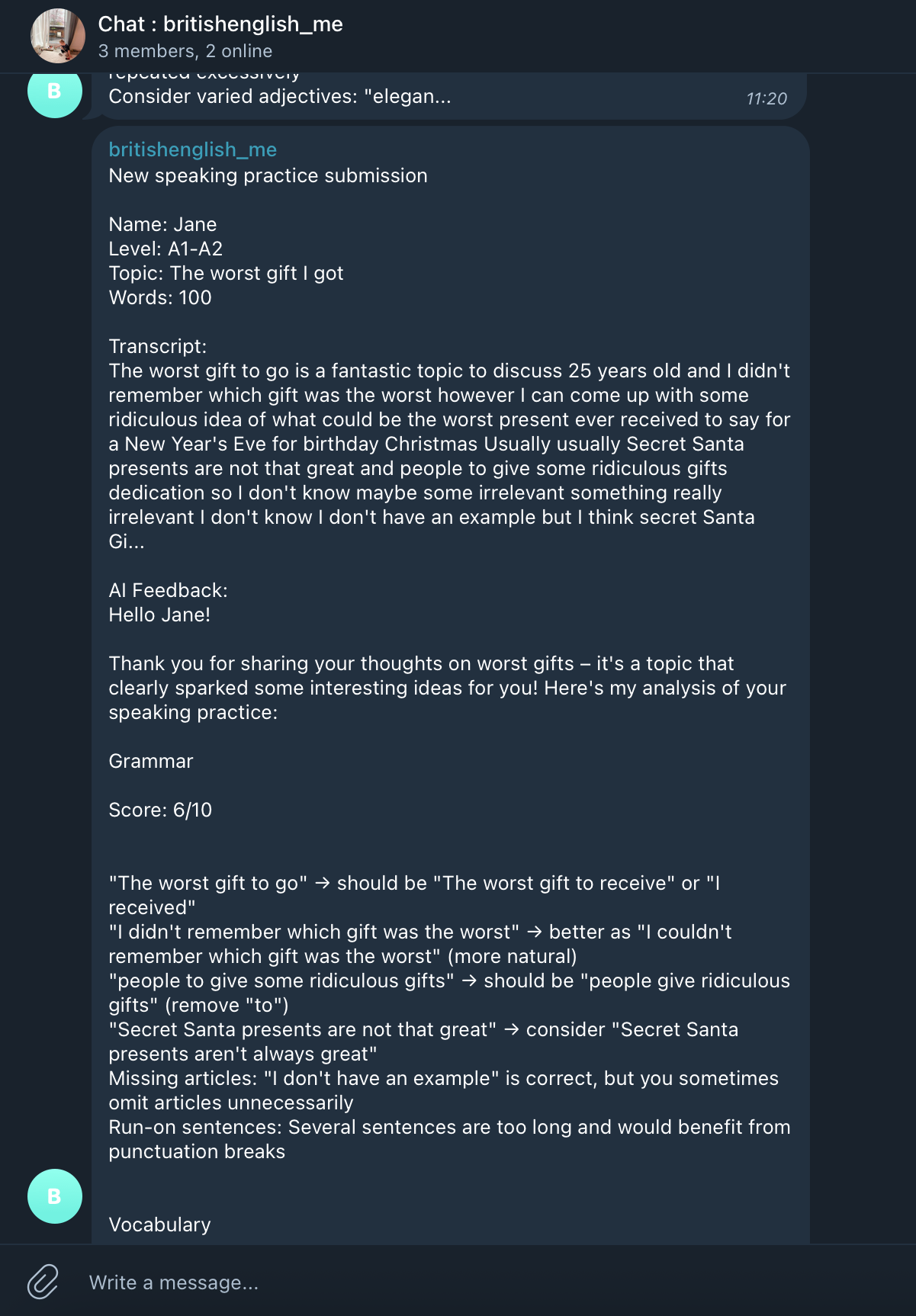
This was refreshingly painless. Six commands and about two minutes of my life:
cd stack/worker && npm init -y && npm install --save-dev wrangler
npx wrangler login
npx wrangler secret put ANTHROPIC_API_KEY
npx wrangler secret put TELEGRAM_BOT_TOKEN
npx wrangler secret put TELEGRAM_CHAT_ID
npx wrangler deploy
That is genuinely it. No CI/CD pipeline. No Docker. No devops team. Just a teacher with a terminal.
This one nearly broke me. I recorded myself saying "I am just testing this new website", the live transcript showed every word perfectly, and then the result said "No speech was detected." Excuse me, what?
Turns out the Web Speech API holds text as "interim results" before finalising them. When you stop recording, the last chunk of speech is often still interim. It never gets promoted to a final result. It is like writing an essay in pencil and then someone erases the last paragraph before you hand it in.
let lastInterim = '';

recognition.onresult = (event) => {
  let interim = '';
  for (let i = event.resultIndex;
       i < event.results.length; i++) {
    if (event.results[i].isFinal) {
      finalTranscript += event.results[i][0].transcript;
    } else {
      interim += event.results[i][0].transcript;
    }
  }
  lastInterim = interim;
};

function stopRecording() {
  if (lastInterim) {
    finalTranscript += lastInterim;
  }
  // now finalTranscript has everything
}This is the part that genuinely surprised me.
| Component | Cost |
|---|---|
| Web Speech API (transcription) | Free |
| Cloudflare Worker (backend) | Free tier |
| Claude Haiku (AI analysis) | Less than $0.005 per request |
| Telegram Bot API | Free |
| AWS S3 + CloudFront (hosting) | Pennies per month |
| Total per user session | Less than one penny |
For context, a single trial lesson takes 30 minutes of my time. This tool handles unlimited "trial experiences" for essentially nothing. The ROI is so good it feels illegal.
I described features in plain English and watched them appear. "Add more blue." "The transcript disappears when I stop recording." "Add some funny topics about dating." Each time, the code changed and the thing just worked.
The whole project is one HTML file (frontend), one JavaScript file (backend), and a few API keys. No React. No database. No Docker containers. No Kubernetes. No mysterious acronyms that sound like they should be medical conditions. Just files that do things.
Getting the basic page working took about an hour. The remaining time was spent on polish: colours, topic selection, bug fixes, deployment quirks. Much like teaching, really. Getting a student to B1 is the easy part. Getting them from B2 to C1 is where you earn your money.
The speaking practice page is live and working. Students can try it at any time, I get notified on Telegram, and the AI feedback is honestly pretty good. Better than what I could write in the same time, if I am being honest.
Next up: connecting ManyChat to my Instagram so that every time someone comments on a post, they automatically get a DM with the speaking practice link. Free lead generation on autopilot. Because if there is one thing I have learned from this experience, it is that the best tools are the ones that work while you sleep.
The irony of an English teacher building an AI-powered English practice tool is not lost on me. But here we are. And honestly? It is pretty cool.
Want to try the speaking practice tool?
Give it a go